> For the complete documentation index, see [llms.txt](https://guide.prismlive.com/llms.txt). Markdown versions of documentation pages are available by appending `.md` to page URLs; this page is available as [Markdown](https://guide.prismlive.com/desktop/guides/error-solution/streaming/disconnected-from-server.md).
# Disconnected from server
Windows, Mac
{% hint style="danger" %}
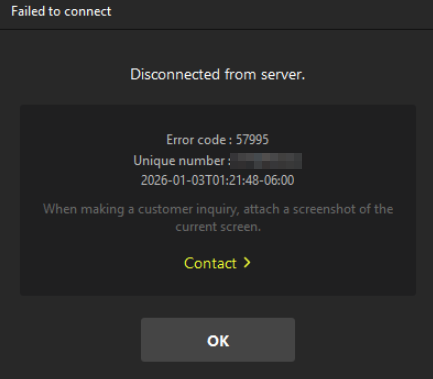
Error Message: Disconnected from server (Error code: 57995)
{% endhint %}
We have identified cases where live streaming to YouTube via RTMP may be interrupted or become unstable when using PRISM Live Studio.
When this issue occurs, users may see a **“Disconnected from server”, Error code: 57995** message in the PRISM PC app, causing the live stream to stop.
***
#### Cause
1. Instability within the user’s local network environment.
2. Insufficient upload speeds required to maintain a stable live stream.
3. Weak Wi-Fi signals preventing data from being transmitted from the client to the server in a timely manner.
4. Interference from system firewalls or third-party security software blocking the streaming connection.
***
#### How to Fix
1. **Ensure a stable network environment** To maintain a consistent data transmission, we highly recommend using a **wired internet connection (LAN)** rather than Wi-Fi.
2. **Verify antivirus and firewall settings** Temporarily disable antivirus programs or network firewalls to ensure that the streaming connection is not being blocked or interfered with.
***
[Desktop](/desktop/overview.md), [Guides](/desktop/guides.md), [Error Solution](/desktop/guides/error-solution.md), [Streaming](/desktop/guides/streaming.md)
---
# Agent Instructions
This documentation is published with GitBook. GitBook is the documentation platform designed so that both humans and AI agents can read, navigate, and reason over technical content effectively. Learn more at gitbook.com.
## Querying This Documentation
If you need additional information that is not directly available in this page, you can query the documentation by asking a question.
Perform an HTTP GET request on the following URL with the `ask` and `goal` query parameters:
```
GET https://guide.prismlive.com/desktop/guides/error-solution/streaming/disconnected-from-server.md?ask=&goal=
```
`ask` is the immediate question: it should be specific, self-contained, and written in natural language.
`goal` is what the user is ultimately trying to achieve, the reason they need the answer. Sharing it helps GitBook give you a better, more relevant answer. A goal is most helpful when it describes the outcome the user wants rather than restating the question. For example, with `ask=how do I create an API token`, a goal like `automate deployments from our CI pipeline` lets GitBook tailor the answer to that use case.
The response will contain a direct answer to the question and relevant excerpts and sources from the documentation.
Use this mechanism when the answer is not explicitly present in the current page, you need clarification or additional context, or you want to retrieve related documentation sections.