> For the complete documentation index, see [llms.txt](https://guide.prismlive.com/llms.txt). Markdown versions of documentation pages are available by appending `.md` to page URLs; this page is available as [Markdown](https://guide.prismlive.com/lens/guides/error-solution/handling-failed-to-apply-virtual-background.md).
# Handling failed to apply virtual background
Windows
{% hint style="danger" %}
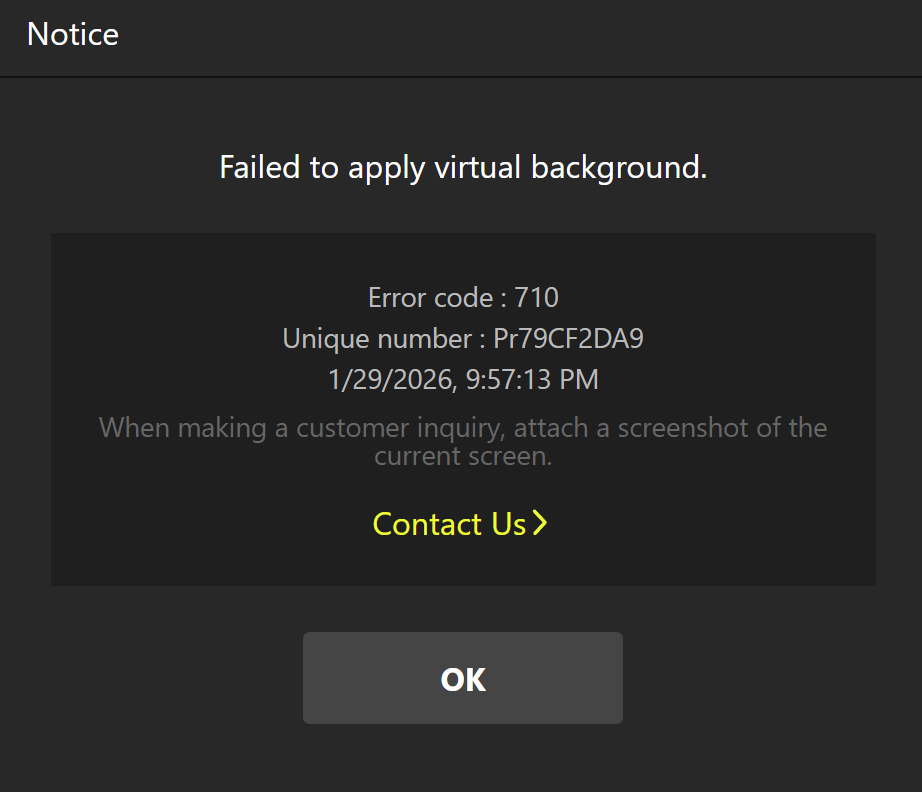
Error Message: Failed to apply virtual background (Error code: 710)
{% endhint %}
You may encounter this error when attempting to apply a virtual background in PRISM Lens. This occurs when the program fails to properly recognize the core model files required for background detection.
Error Screen
***
### Cause
This issue is typically caused by the following factors:
* Missing or Corrupted Files: Essential model files were not installed correctly or became corrupted due to disk errors.
* Installation Path Issues: The installation path contains special characters or is too long, preventing the app from accessing the files.
* Insufficient Disk Space: Lack of storage on the installation drive prevented the package from decompressing properly.
### Solution
{% stepper %}
{% step %}
#### **Reinstall PRISM Lens**
1. Uninstall the current PRISM Lens from your Control Panel.
2. Download the latest version of PRISM Lens from the official website.
3. Complete the installation and check if the virtual background feature works correctly.
{% endstep %}
{% step %}
#### **Check the Installation Environment**
If the issue persists after reinstallation, please verify your system environment:
* Verify Installation Path: Ensure the path does not contain special characters and try to use the default installation directory.
* Clear Disk Space: Ensure there is sufficient free space on your installation drive.
{% endstep %}
{% step %}
#### **Manually Verify the Model File**
If the steps above do not work, please follow these steps to manually verify if the required model file exists in the installation path.
1. Right-click the PRISM Lens shortcut icon on your desktop.
2. Click \[Open file location] from the menu to go to the PRISMLens installation folder.
3. Within that folder, navigate through the following subfolders in order:
`resources` > `app.asar.unpacked` > `node_modules` > `core-node` > `data` > `models`
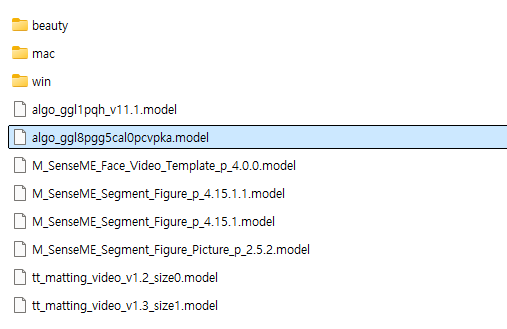
4. In the final models folder, check if the file named `algo_ggl8pgg5cal0pcvpka.model` is present.
1. If the file is missing: It indicates the installation package did not unpack correctly. Please attempt to reinstall the app once more.
Reference
{% endstep %}
{% endstepper %}
---
# Agent Instructions
This documentation is published with GitBook. GitBook is the documentation platform designed so that both humans and AI agents can read, navigate, and reason over technical content effectively. Learn more at gitbook.com.
## Querying This Documentation
If you need additional information that is not directly available in this page, you can query the documentation dynamically by asking a question.
Perform an HTTP GET request on the current page URL with the `ask` query parameter, and the optional `goal` query parameter:
```
GET https://guide.prismlive.com/lens/guides/error-solution/handling-failed-to-apply-virtual-background.md?ask=&goal=
```
`ask` is the immediate question: it should be specific, self-contained, and written in natural language.
`goal` is optional and describes the broader end goal you are ultimately trying to accomplish on behalf of the user. GitBook uses it to tailor the answer towards what is most useful for that goal.
The response will contain a direct answer to the question and relevant excerpts and sources from the documentation.
Use this mechanism when the answer is not explicitly present in the current page, you need clarification or additional context, or you want to retrieve related documentation sections.