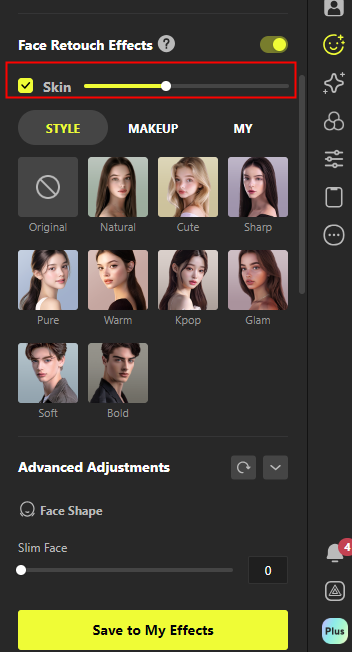
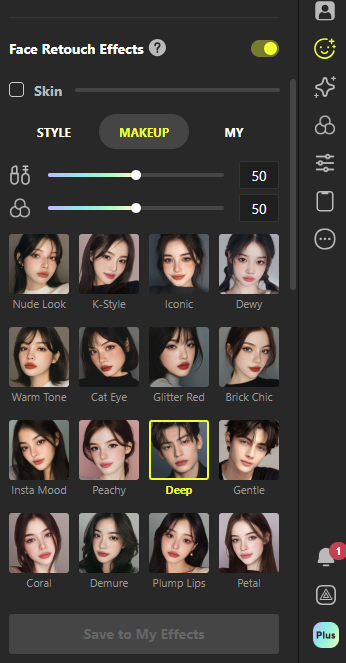
> For the complete documentation index, see [llms.txt](https://guide.prismlive.com/llms.txt). Markdown versions of documentation pages are available by appending `.md` to page URLs; this page is available as [Markdown](https://guide.prismlive.com/lens/guides/error-solution/skin-correction-disappearing-issue-guide.md).
# Skin Correction Disappearing Issue Guide
Intermittent deactivation of skin correction effect in bright skin tone environments
### 1.Overview of the Issue
In some user environments, the **“Face Effect > Skin”** correction feature in Prism Lens may intermittently deactivate or become unstable during use.
* This occurs mainly among users with **bright skin tones** or when using **strong white lighting** conditions.
* The issue appears as the skin correction effect being properly applied at first,\
but suddenly disappearing or becoming inconsistent after a certain period.
* It can also occur after **minor facial movements** such as smiling or turning the head, even if the video scene itself is relatively static (e.g. game screen not changing).
***
### 2.Cause
The **Skin Correction** function in Prism Lens uses a **color-based skin detection algorithm** that identifies and smooths skin tones in real time.\
The current version of this algorithm is optimized for **medium (yellowish) skin tones**, and thus may have the following limitations under certain conditions:
* Skin areas that are too bright may not be recognized properly, causing the correction effect to be disabled intermittently.
* Under strong or high color-temperature lighting (especially white or cool blue lights), the accuracy of skin tone detection may decrease.
* Subtle facial expressions or head movements may momentarily move the detected skin region out of range, temporarily disabling the effect.
As a result, this phenomenon may occur during live streaming even when the lighting and camera remain unchanged.\
It tends to appear more frequently under **bright lighting** or **static screen conditions**.
***
### 3.Temporary Workarounds and Recommendations
Until the algorithm update is released, the following methods can help mitigate or reduce the issue:
**(1) Optimize Lighting Environment**
* Use **warm-tone lighting** to improve detection accuracy and maintain a stable correction effect.
* Avoid using **strong white** or **cool blue** lights, as they can cause recognition errors.
* Adjust lighting so that there is not a large brightness difference between your face and background.
**(2) Utilize Makeup Effects**
* The **Makeup Effect** uses a separate correction algorithm that performs more stably even with bright skin tones.
* Enabling the makeup effect helps maintain a natural skin appearance even if the primary correction effect temporarily deactivates.
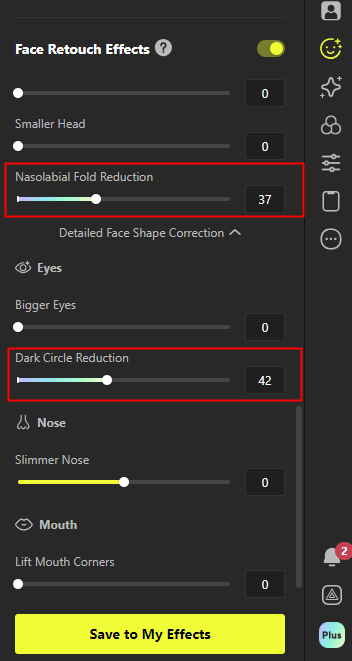
**(3) Use Advanced Correction Features**
* Combining individual correction options such as '**Dark Circle Reduction'** and '**Nasolabial Fold Reduction'** can enhance the overall skin texture.
* These features operate independently of the skin correction function, maintaining consistency even when the correction effect becomes unstable.
 ***
### 4.Future Improvements
The Prism development team is currently researching and testing a **new skin correction algorithm** designed to operate more reliably across various **skin tones and lighting conditions**.
The new algorithm aims to achieve the following improvements:
* Expanded skin tone recognition range
* Automatic lighting environment adjustment
* Enhanced real-time facial expression tracking and response
After internal quality verification, these improvements will be implemented through future Prism Lens updates.
***
### 5.Additional Notes
The Prism team is continuously working to minimize visual inconsistencies across different user environments\
and to ensure a natural and consistent skin correction experience for all users.
Further details on these improvements will be shared in upcoming update notes.
***
### 4.Future Improvements
The Prism development team is currently researching and testing a **new skin correction algorithm** designed to operate more reliably across various **skin tones and lighting conditions**.
The new algorithm aims to achieve the following improvements:
* Expanded skin tone recognition range
* Automatic lighting environment adjustment
* Enhanced real-time facial expression tracking and response
After internal quality verification, these improvements will be implemented through future Prism Lens updates.
***
### 5.Additional Notes
The Prism team is continuously working to minimize visual inconsistencies across different user environments\
and to ensure a natural and consistent skin correction experience for all users.
Further details on these improvements will be shared in upcoming update notes.
---
# Agent Instructions
This documentation is published with GitBook. GitBook is the documentation platform designed so that both humans and AI agents can read, navigate, and reason over technical content effectively. Learn more at gitbook.com.
## Querying This Documentation
If you need additional information that is not directly available in this page, you can query the documentation dynamically by asking a question.
Perform an HTTP GET request on the current page URL with the `ask` query parameter, and the optional `goal` query parameter:
```
GET https://guide.prismlive.com/lens/guides/error-solution/skin-correction-disappearing-issue-guide.md?ask=&goal=
```
`ask` is the immediate question: it should be specific, self-contained, and written in natural language.
`goal` is optional and describes the broader end goal you are ultimately trying to accomplish on behalf of the user. GitBook uses it to tailor the answer towards what is most useful for that goal.
The response will contain a direct answer to the question and relevant excerpts and sources from the documentation.
Use this mechanism when the answer is not explicitly present in the current page, you need clarification or additional context, or you want to retrieve related documentation sections.